Tapo L930-5 Light Strip Review: Is It Worth The Price?
Want a light strip that adds a soft glow to your room? The Tapo L930-5 light strip could be the right pick. Many people look for an easy way to set the mood at home.
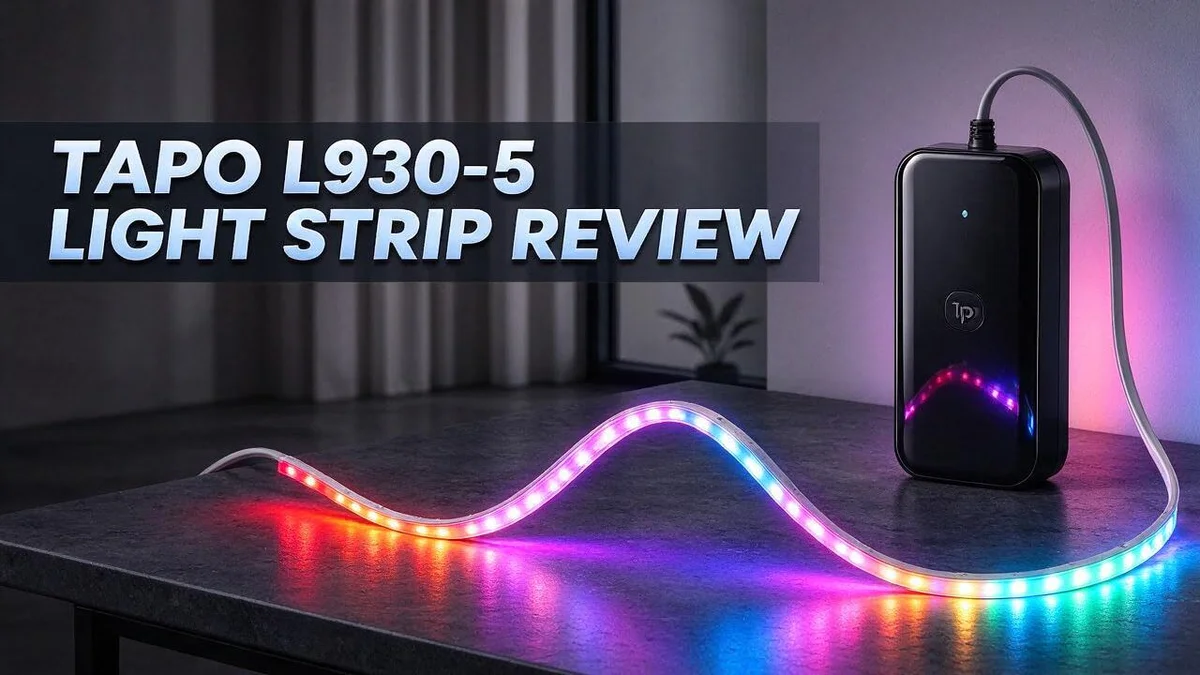
This strip gives off a soft, transparent light. Its PU exterior coating helps spread the glow evenly. You can bend it, cut it, and attach it wherever you like.
Control is simple, too. You can change colors and brightness from the app. A tech review from November 2021 said the strip “worked well” with the phone app, tactile controls, and voice control.
Keep in mind that this review tested the Tapo L900-5, a close relative of this model. It also noted some software niggles. This guide covers what the L930-5 offers and what to check before you decide.
In a Nutshell
- Bends and cuts to fit your space: This light strip stays flexible, so you can shape it around shelves, desks, or corners. You can also trim it to the length you need.
- Set up in your own language: The installation guide comes in 32 languages. That makes it simple for people around the world to get started.
- Keep your lights organized: Home and Room settings let you group lights by space. This helps you manage several strips at once and keep your lighting neat across the house.
- Enjoy phone and voice control: A 2021 tech review said the app worked well. The reviewer also liked the tactile and voice control options, which give you more ways to change colors and brightness.
- Expect a few software quirks: The same review mentioned some software niggles, but the details were cut short in the source. Read recent feedback to see if these issues still exist.
- Check the model number first: The review tested the Tapo L900-5 rather than the L930-5. Confirm your model before you decide, since results may differ slightly.
Diffused Glow and Light Quality

- Brighter White Light: The Tapo L930-5 LED light strip provides 1000 lumens of bright, clean white light...
- Premium Lighting: This LED strip light is 20% brighter and lasts 50% longer than other LED light strips...

Last update on 2026-11-26 / Affiliate links / Images from Amazon Product Advertising API
Light quality matters just as much as the glow itself. Many bare LED strips show tiny bright dots along their length. A coating like this one spreads the light out, so the line looks smooth and even.
A smooth line feels calm to the eye. It also makes a room look more balanced at night. Harsh spots can feel tiring after a long evening.
Placement changes the feel. Try the strip behind a TV or along the top of a bookshelf. Light that bounces off the wall looks wider and gentler. Light aimed straight at your face can feel sharp.
Brightness is your best friend. Lower the intensity in the evening for a cozy mood. Raise it when you read or tidy up. The app makes these changes quick, so you can adjust in seconds.
Color choices shape the mood. Warm shades suit relaxing nights and movie time. Cooler tones feel fresh when you work near the strip. Test a few colors before you settle on one.
Surfaces change the result. Shiny paint or glass can reflect the light in odd spots. Matte walls usually give a softer, more even glow.
Try a night test. Turn off the room lights and take a photo with your phone. The picture shows how the glow spreads. This quick check helps you pick the best spot before you mount the strip.
Layering adds depth. Combine the strip with a floor lamp or a small table light. Two sources of soft light create a richer look. The strip then becomes the base layer for the whole room.
Keep the strip clean. Dust can build up on the surface over time. Wipe it gently with a dry cloth every few weeks. Clean light looks brighter and more even.
Overall, the diffused look suits people who want mood lighting rather than task lighting. It gives a gentle wash that fills a space without glare.
Flexibility, Cutting and Mounting
Flexibility makes setup much easier. You can curve the strip around desk edges, shelf lips, or the back of a cabinet. Gentle bends look smooth, while sharp folds can strain the strip. Take your time when you shape it.
Measure before you cut. Lay the strip along the surface first. Mark the exact spot where you want to stop. Cutting in the wrong place can leave part of the strip dark, so check twice.
Only cut along the marked cut lines on the strip. Cutting elsewhere can damage the circuit and stop the light from working on the remaining section.
Prepare the surface for mounting. Clean the area with a dry cloth first. Dust and oil can stop the adhesive from holding well. Let the surface dry completely before you start.
Peel the backing slowly and press the strip down firmly. Hold each section for several seconds. This helps the adhesive grab the surface.
Plan the power cable route. Think about where the plug will sit before you begin. Hide the cable behind furniture for a neat look. A short, clear path keeps the setup tidy.
Corners need extra care. Leave a small loop of slack so the strip does not pull tight at the bend. This protects the strip over time.
Think about the bend radius. Avoid tight loops in one spot. Spread the curve over a longer length for the best look.
Mounting on textured walls needs a different approach. Small clips or channels can hold the strip more firmly than tape alone.
Try a dry run first. Arrange the strip, then check the glow from your usual seat. You can move it easily before you peel any backing.
Keep a little extra length at each end. This gives you room to adjust the position later.
Test the placement with painter’s tape. This lets you move the strip without damaging the wall paint. Once you like the spot, switch to the final adhesive.
If the strip falls off later, check the surface again. Wipe it clean and apply a fresh layer of adhesive.
Finally, look at the strip after mounting. Make sure every section lights up evenly and sits flat against the surface.
App, Voice and Tactile Control
Your phone can act as a simple remote. Open the app and pick the color you want. Then move the slider to set the brightness level.
Quick changes save time on busy evenings. You can switch from a bright work light to a soft mood glow in seconds.
Touch control gives you a direct option. Tactile control lets you adjust the strip without opening an app. This suits people who like quick, simple actions.
Touch control also helps when your phone sits in another room or charges on a desk.
Voice control keeps your hands free. Speak a command and the strip responds. This helps when you carry a cup, a book, or a basket of laundry.
Keep the room fairly quiet when you give voice commands. Background noise can make the system miss your request.
Mix the three methods for daily ease. Use the app for detailed color changes. Use touch for quick adjustments. Use voice when your hands are busy.
Talk with your household about which method each person prefers. Some people love voice, while others trust the app more.
Test each method before you rely on it. Spend a day trying the app, touch, and voice options. Notice which one feels most natural to you.
Set realistic expectations for voice. Simple commands work best. Long sentences may confuse the system, so keep requests short and clear.
Plan your routine around these controls. Decide which settings you use most often. Keep those options within easy reach so you can change them quickly.
Keep your app updated so you get the latest features. Updates can improve how the controls respond.
A little practice makes each method feel natural. After a week, most people choose one favorite way to control their lights.
Top 3 Alternatives
Looking for a light strip that fits your space? These three options offer great color, easy setup, and smart control. Each one brings something different to your room.
Philips Hue Lightstrip Plus

- WHAT’S IN THE BOX - Includes one 6-feet, color-changing single-color effect light strip plus base kit...
- UNLOCK THE FULL POWER OF HUE - Add a Hue Bridge to enjoy automations, control from anywhere in the world...
Last update on 2026-11-26 / Affiliate links / Images from Amazon Product Advertising API
Philips Hue Lightstrip Plus is a strong pick for people who want reliable performance. It works best with the Hue Bridge and a free app. You get millions of colors and smooth white tones.
The strip also syncs well with music and video. Many people place it behind their TV or desk. It feels polished and well built.
Govee RGBIC Strip Lights

- More Length, More Impact: Two 50ft reels give you ample length to outline ceilings, beds, or...
- Smart RGBIC Effects: Unlike single-color RGB strips, Govee LED Lights show multiple distinct colors...
Last update on 2026-11-26 / Affiliate links / Images from Amazon Product Advertising API
Govee RGBIC Strip Lights stand out for their bright, multi-color effects. Each section can show a different shade at the same time. This creates a lively look that many users love.
Setup is quick with the Govee app. You can also link the lights with voice assistants. They suit gamers, party hosts, and anyone who likes bold color.
Nanoleaf Lines

- 【 DIY RGB Line lights 】 Any combination of 9 light bars can be used to create as many wall lights as...
- 【 Music Sync modes 】 The lights can dance to the rhythm of the music collected by the device's...
Last update on 2026-11-26 / Affiliate links / Images from Amazon Product Advertising API
Nanoleaf Lines take a modern, geometric approach. Each line connects to the next, so you can build custom shapes on your wall. The design looks sleek and fits contemporary decor.
The lines support Matter and work with major smart home platforms. They also respond to music and screen colors. Choose this option if you want a striking display.
Each option has clear strengths. Pick the one that matches your goals, whether you want steady performance, vivid effects, or a unique wall design.
Room and Home Scene Configuration
Good scene setup starts with the room. Open the Tapo app and assign the strip to the correct room. Clear room names make the app easier to read. Name the room after its main use, such as Living Room or Study.
Next, think about the whole home. The Home feature lets you manage many devices together. You can switch lights across the house with one tap. This helps when you leave or go to bed.
Scenes give you a ready mood. Create a scene that pairs the strip with other lights in the room. Give each scene a short, clear name. Movie Night or Morning Glow works well.
Name scenes by moment, not by color. A name like Dinner tells you when to use it. A name like Blue tells you little. Simple names help everyone in the house pick the right option fast.
Pay attention to who uses each room. A child’s bedroom may need a softer scene than a kitchen. Set up separate scenes for each person. Each room can hold its own mood.
The research review covered a sibling model, the Tapo L900-5, not the L930-5. Setup steps may differ slightly. Check the app screens before you follow any guide. Confirm each option on your own device.
Test each scene at night with the room lights off. Watch how the strip looks against the walls and furniture. Adjust brightness until the scene feels right. Save the final version so it stays the same.
Share control with the household. Add trusted family members to the Home so they can run scenes from their phones. Explain which scene does what. Clear rules keep the lights working well for everyone.
Review your scenes every few weeks. Remove the ones you never use. Add a new scene when your routine changes. This keeps the setup simple and useful over time.
Setup Guide and Language Support
Start with the Tapo app. Download the app to your phone before you open the box. Create an account and sign in with your email address. This small step saves time later.
Read the whole guide first. Scan every page before you start. This helps you spot the power and pairing steps quickly. A short read also shows you which parts you need, such as the strip and the power adapter.
Connect to a 2.4 GHz network. Many smart lights need this band to pair with the app. Keep your phone close to the strip during setup. Good signal strength makes the process smoother.
Pair the strip in a few taps. Tap the add device button in the app. Select the lighting category and follow the prompts on screen. The app finds the strip and links it to your account.
Power the strip correctly. Plug the power adapter into a wall outlet near the strip. Wait until the light shows that it is ready. Leave the power on during the whole pairing process.
Check the language options. The installation guide is available in 32 languages. Pick the version that matches your first language. Most people will find one version that feels natural to read. Readers who prefer images can follow the diagrams with little text.
Fix pairing problems quickly. If the app cannot find the strip, move your phone nearer to the router. Turn the power off for a few seconds, then turn it back on. Try the pairing steps again after the light restarts.
Keep the guide for later. Save a photo of the guide or keep the paper copy in a drawer. You may need it when you add a new strip. Check the app for firmware updates now and then.
Pros and Cons
Pros
- Soft glow: The PU coating spreads a gentle, transparent light.
- Bend it around corners, shelves, or furniture edges.
- Trim the strip to fit the exact length you need.
- One tech reviewer said it worked well in everyday use.
Cons
- A reviewer noticed some niggles with the software design.
- The research does not list full specs for this exact model.
- The main review covered a sibling model, so results may differ.
- Clear top competitors are not named in the available sources.
Who Should Buy It
This light strip suits people who want a soft, gentle glow instead of harsh brightness. It works well as accent lighting for shelves, corners, and furniture edges.
Renters and people in small spaces often gain the most. A flexible strip fits awkward gaps without a large installation project.
Frequent decorators also benefit from this design. You can bend the strip, trim it, and reposition it whenever your room changes.
People who like multiple control methods will feel at home. Some prefer tapping the phone screen, while others enjoy giving voice commands from across the room.
Households with mixed tech comfort should plan ahead. One reviewer noticed niggles with the software design, so less confident users may need extra patience.
Buyers who need strong task lighting should look elsewhere. The soft, diffused effect suits mood and ambient use better than close reading or detailed craft work.
Gamers and media fans may enjoy the ambient effect behind a screen. The soft light can reduce the contrast between a bright display and a dark wall.
Parents and pet owners may appreciate a low glow for night routines. Choose a warm, dim setting so children and pets are not startled.
Shoppers who want proof for this exact model should read carefully. The main review covered a sibling model, so your experience with this strip may differ.
If you already own smart home gear, this strip fits right in. Look for simple voice and app control that match the way your household lives.
Ultimately, the right buyer enjoys soft light, flexible placement, and hands on control. Think about your room, your people, and your daily habits before you decide.
Final Verdict
The Tapo L930-5 light strip delivers a soft, gentle glow. Its best trait is how easily it fits into a relaxed home setup. Whether it suits you depends on what you need most from your lighting.
Software comes first. A reviewer noticed small niggles with the app design. If you enjoy a smooth, polished experience, spend a few minutes exploring the app before you commit.
Remember that the main review tested the Tapo L900-5, not this exact model. That gap matters. Look for feedback that names the L930-5 directly before you make a final choice.
Placement also shapes your results. A strip hidden behind a cabinet gives a different effect than one tucked under a shelf. Try a few spots before you fix it in place. The light looks different on white walls than on darker paint.
Ask yourself three simple questions. Do you want ambient light rather than bright light? Do you enjoy controlling lights with your phone or your voice? Can you plan a flexible layout that bends around edges? If you answer yes to all three, this strip likely fits.
Still unsure? Test the strip in one corner first. Watch how the light spreads across the wall and furniture. Notice how the app responds during your normal evening routine. Real use reveals more than any product sheet.
Check the return policy from your seller before you open the box. A clear return window gives you room to test the light in your own space.
The core experience feels pleasant overall. The light feels calm rather than sharp. Many people find that calm tone easier to live with after a long day.
The bottom line: the Tapo L930-5 suits people who want relaxed, decorative lighting. It does not replace a desk lamp or a ceiling fixture. Choose it for atmosphere, and you will likely enjoy the result.
Frequently Asked Questions
Can I control the strip with my voice?
Yes, voice control is part of the experience. A tech reviewer from November 2021 said voice control worked well. That review tested the sibling model, the Tapo L900-5. Check your own smart home setup before you buy, so you know your voice assistant will connect smoothly.
How do I group the strip with other lights?
Use the Home and Room settings in the Tapo app. Place the strip in a room, then give that room a clear name. This setup lets you switch the glow on or off with one command. It also helps when you control several lights at once.
Can I change the color and brightness myself?
Yes, the app lets you adjust both color and intensity. Start with a low level for evening use. Then raise the brightness slowly until the mood feels right. Small changes make a big difference in how the soft glow looks on your wall.
Is the strip safe for outdoor use?
The available sources do not confirm outdoor use. Check the product label or ask your seller before you install it outside. Do not assume the strip works outdoors just because it looks flexible and durable.