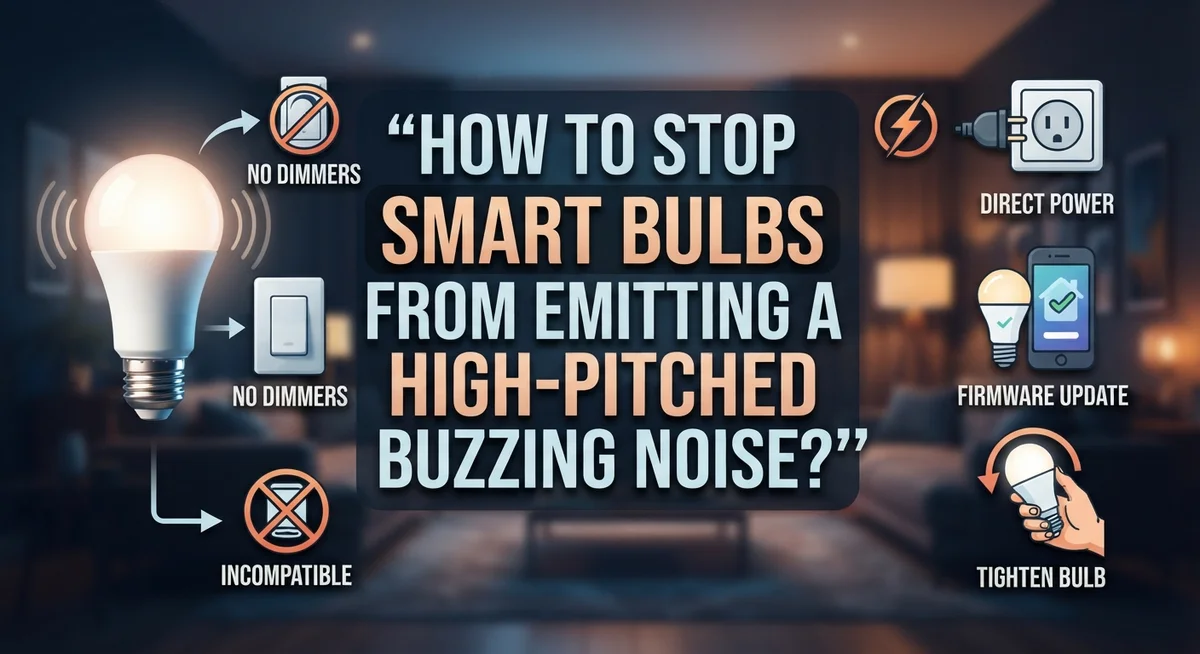
How to Stop Smart Bulbs From Emitting a High-Pitched Buzzing Noise?
Do your smart bulbs make a strange buzzing sound? You are not alone.
The good news? This problem has clear causes and simple fixes. Sometimes it’s an inherent LED quirk. Other times, your power supply or dimmer switch is the real culprit.
Voltage fluctuations, dimmer incompatibility, and defective bulbs all play a role in this common issue. Understanding which factor affects your setup makes solving it much easier.
This guide walks you through practical steps to identify the source of that buzzing sound. You will learn how to test your bulbs, check your dimmer compatibility, and rule out power supply problems.
In a Nutshell
Check the dimmer first. Many smart bulbs buzz because of an incompatible dimmer switch. LED bulbs need dimmers built for them, not old-style ones.
Test the power supply. Voltage fluctuations often cause that whine. Make sure your circuit gives the bulb steady, adequate power.
Try a simple reset. Unplug the lamp or fixture. Leave it unplugged overnight, then plug it back in. This often clears the noise.
Rotate the bulb. A quick half or quarter turn can fix loose connections causing buzz.
Replace the bulb if needed. Defective bulbs are a common culprit. Swapping it out often solves the problem instantly.
Update your smart switch settings. Power cycle the switch and check the manufacturer app for firmware updates or setting changes.
Why Smart Bulbs Buzz: Understanding the Root Causes
Smart bulbs buzz for several specific reasons. Understanding these causes helps you fix the problem quickly.
LED bulbs naturally emit sound. LEDs work by converting electrical current into light. This process creates vibrations in the bulb’s internal components. These vibrations produce that high pitched whine you hear. Not all LEDs buzz equally, but many do this to some degree.
Power supply problems trigger buzzing. Your home’s electrical system delivers voltage to your bulbs. When voltage fluctuates or drops below normal levels, LEDs work harder to produce light. This extra strain causes components to vibrate faster and louder. Unstable power is a major culprit behind persistent buzzing.
Dimmer switches cause conflicts. Smart bulbs often don’t work well with older dimmer types. Traditional dimmers were designed for incandescent bulbs, not LEDs. When you use an incompatible dimmer with a smart bulb, the bulb’s circuitry struggles to handle the dimming signal. This struggle creates that annoying buzz sound.
Defective bulbs are common. Manufacturing defects happen. A bulb with a faulty component will buzz consistently. The internal circuitry might have a loose connection or a damaged resistor. These defects make the bulb vibrate more than normal models.
Loose connections add to the noise. Sometimes the bulb sits loosely in the socket. This loose fit allows vibrations to transfer to the fixture itself. The fixture then amplifies the sound, making the buzz louder and more noticeable.
Smart switch settings matter too. Your smart bulb’s app or switch settings can influence buzzing. Certain firmware versions or power settings may increase electrical noise. The switch itself might have compatibility issues with your specific bulb model.
Each of these causes requires a different solution. The good news is that most buzzing problems have quick fixes. Start by identifying which cause applies to your situation.
Diagnosing the Source: Is It the Bulb, Dimmer, or Wiring?
Finding the source of that buzzing sound is the first step to fixing it. The noise could come from the bulb itself, your dimmer switch, or your home’s wiring. Let’s narrow it down.
Start by turning off the lights and listening carefully. Does the buzz stop immediately? If yes, the sound is coming from your lighting system. If you still hear it, the issue may be elsewhere in your electrical setup.
Next, test the bulb in a different fixture without a dimmer. Screw it into a standard lamp in another room. Does the buzz disappear? This tells you the dimmer is likely the culprit. If the buzz follows the bulb to the new location, the bulb itself is the problem.
For fluorescent or certain LED bulbs, try rotating the bulb slightly. Turn it a quarter or half turn in the socket. Loose connections between the bulb and socket often cause vibration and noise. This simple fix works surprisingly well.
Now check your dimmer switch. Look at the brand and model number. Some older dimmer types simply don’t work with modern LED bulbs. If you have a standard incandescent dimmer paired with a smart LED bulb, that mismatch creates buzzing. Note the dimmer type for later reference.
Test your power supply next. Voltage fluctuations in your home’s electrical system can trigger buzzing. Plug a lamp into different outlets around your house. If the buzz changes or disappears in other locations, unstable voltage is the cause.
Finally, unplug the lamp completely and leave it unplugged overnight. This resets the bulb’s internal circuitry. Plug it back in the next day and listen. Many buzzing issues resolve after a full reset.
Document your findings. Write down which fixture buzzes, whether it’s dimmer related, and if the bulb or the dimmer seems responsible. This information helps you choose the right solution.
Step-by-Step: Testing and Isolating the Buzzing Noise
Once you’ve identified that buzzing is happening, the next step is to pinpoint exactly where it’s coming from. This process saves time and prevents unnecessary bulb replacements.
Start by turning off all the lights in the affected room. Listen carefully for a few seconds. If the buzzing stops completely, you’ve confirmed the sound comes from your smart bulb setup, not from something else like HVAC equipment or appliances.
Now test the problematic bulb in a different fixture. Choose a lamp or socket that doesn’t use a dimmer. Screw the bulb in and turn it on. If the buzzing disappears, your dimmer switch is likely the culprit. If the noise continues, the bulb itself is probably defective.
For fluorescent or certain LED bulbs, try a simple rotation test. Turn off the light first. Then rotate the bulb a quarter turn or half turn in its socket. This can tighten loose internal components. Power the light back on and listen. Sometimes that’s all it takes.
Next, examine your dimmer switch closely. Check the brand name and model number on the device. Write these down. Different dimmer types work differently with smart bulbs. Some older dimmers simply aren’t compatible with LED technology.
Test your power supply by unplugging the lamp completely. Leave it unplugged for several hours or overnight. This allows the bulb’s internal circuitry to fully reset. Plug it back in and test again. Many buzzing issues resolve after a proper power cycle.
Finally, if you’re using a smart switch instead of a traditional dimmer, check your manufacturer’s app. Look for firmware updates or settings that control brightness levels or dimming speed. Sometimes adjusting these settings reduces or eliminates buzzing entirely.
Document your findings. Note which fixture has the problem, whether a dimmer is involved, and whether the noise changes with different bulbs. This information helps you choose the right solution next.
Fixing Dimmer Incompatibility Issues
Dimmer switches are one of the most common culprits behind smart bulb buzzing. Many dimmers sold before LED technology became mainstream simply don’t work well with modern smart bulbs. The incompatibility happens because older dimmers use different electrical signals than what smart bulbs need.
Check your dimmer’s compatibility first. Look at the brand and model number on your dimmer switch. Some dimmer types work better with certain bulb brands than others. Write down this information and compare it against your bulb’s specifications. Your smart bulb’s manual or packaging usually lists which dimmers work best.
The real problem occurs when a dimmer sends unstable electrical signals to your smart bulb. This causes the bulb’s internal components to vibrate at high frequencies, creating that annoying buzzing sound. The dimmer may work fine with traditional incandescent bulbs but fail completely with LEDs and smart bulbs.
Test your dimmer by replacing it temporarily. Unscrew your current dimmer and install a basic on/off switch instead. If the buzzing stops, your dimmer was the problem. This simple test confirms whether you need a different dimmer or a different bulb.
If testing shows your dimmer is the issue, you have two choices. You can switch to a dimmer model designed specifically for LED and smart bulbs. Many newer dimmers come with LED compatibility built in. Alternatively, you can replace the smart bulb with a different brand or model that works better with your existing dimmer.
Document what you find. Keep notes about which bulbs buzz with your dimmer and which ones don’t. This information helps you make smart purchases in the future. Some bulb and dimmer combinations simply work better together than others, even though both products are high quality.
Resetting and Reconfiguring Smart Switches and Bulbs
Resetting your smart bulbs and switches often stops the buzzing noise completely. This process clears any electrical glitches stored in the bulb’s memory.
Start with a full power cycle. Turn off the smart bulb using your wall switch, not just the app. Wait 30 seconds, then turn it back on. This simple reset works surprisingly well because it clears temporary errors in the bulb’s internal circuitry.
For smart switches specifically, locate the reset button on the device itself. Most models have a small button you press and hold for 10 to 15 seconds. Check your manufacturer’s manual to find the exact location and timing. The switch will usually flash or beep to confirm the reset is complete.
Next, remove the bulb from your smart home app and add it again. Open your app and delete the bulb from your device list. Power cycle the bulb once more. Then add it back as a new device. This forces your system to establish a fresh connection.
Check your app settings after reconfiguring. Some apps let you adjust brightness levels, color temperatures, and refresh rates. Lowering the refresh rate or adjusting dimming curves can reduce electrical noise. Navigate to the bulb’s advanced settings and look for options related to power delivery or flicker control.
If you use a smart dimmer switch, reset it the same way. Power it off completely for one minute, then restore power. Reconfigure it through your app.
Test the bulb in a different room on a different circuit if buzzing continues. This tells you whether the problem is the bulb itself or your home’s electrical setup. Sometimes a fresh configuration solves the issue entirely. If buzzing persists after a complete reset and reconfiguration, the bulb likely has a defective component and needs replacement.
Addressing Power Supply and Voltage Stability Problems
Power supply problems cause many smart bulb buzzing issues. When your electrical system delivers unstable voltage, your bulb’s internal components vibrate at audible frequencies. This creates the high-pitched sound you hear.
Check your home’s voltage stability first. Most homes receive between 110 and 120 volts in North America. If your voltage drops below 110 or spikes above 125, your bulb struggles to function properly. Voltage fluctuations strain the bulb’s circuitry and trigger buzzing.
Test your power supply by moving the problematic bulb to a different room. Use a fixture on a different electrical circuit. If the buzzing stops, your original outlet or circuit has voltage issues. If buzzing continues, the problem lies elsewhere.
Unstable power often occurs near heavy appliances. Refrigerators, air conditioning units, and washing machines draw large amounts of electricity. This causes voltage dips that affect nearby outlets. Try moving your smart bulb away from these appliances.
Older homes frequently have outdated electrical systems. Aging wiring cannot deliver consistent power to modern smart bulbs. If you live in an older house and experience widespread buzzing, your home’s electrical infrastructure may need evaluation.
Power strips and extension cords worsen voltage problems. Plugging lamps into low-quality power strips reduces voltage delivery. Use direct wall outlets whenever possible for smart bulbs.
If you suspect serious voltage instability, contact a licensed electrician. They can test your home’s electrical system with professional equipment. An electrician identifies whether your panel, wiring, or utility connection needs repair.
Meanwhile, try unplugging the affected bulb overnight. This resets the bulb’s internal voltage regulator. Sometimes the bulb’s components become stuck in an unstable state. A full power reset allows them to recalibrate to your home’s actual voltage level.
Common Mistakes That Prevent a Lasting Fix
Many people make simple mistakes that prevent them from fixing smart bulb buzzing. Understanding these errors helps you avoid wasting time and money.
The biggest mistake is skipping bulb replacement. Many assume the problem lies in their dimmer or power supply. In reality, the bulb itself is often defective. The buzzing stops once you swap it for a new one. Always test a different bulb first before investigating other causes.
Another common error is using incompatible dimmers with LED bulbs. Older dimmer switches send unstable signals to smart bulbs. This causes the filament to vibrate and produce noise. Not all dimmers work with all bulb types. You must check compatibility before assuming your dimmer is fine.
People also ignore power supply issues completely. They focus on the bulb or dimmer and miss the real culprit. Voltage fluctuations from your home’s electrical system trigger buzzing. Heavy appliances running nearby create these fluctuations. Moving your lamp to a different room on a different circuit reveals if power is the problem.
Failing to reset your smart devices properly is another mistake. A simple power cycle often stops the noise. Unplug the lamp for several minutes. Remove the bulb from your smart home app. Plug everything back in and reconfigure the connection. This resets the communication between your bulb and switch.
Many people also forget to document their findings. Keep notes about which bulbs buzz and which ones don’t. Write down which rooms have the problem. Record what happens when you move the bulb to different locations. This information helps you identify patterns and pinpoint the actual cause.
Testing one solution at a time prevents confusion. Change only one thing, then observe results. This method helps you discover exactly what fixes your specific buzzing problem.
Final Thoughts
Smart bulb buzzing feels annoying, but it rarely means something serious. Most cases trace back to a simple, fixable cause. Patience and a step by step approach solve the problem quickly.
Start with the easiest fixes first. Swap the bulb, check the dimmer, and confirm your power supply works well. These three areas cause most buzzing noises.
LED technology naturally produces some sound. This happens because of how electricity flows through the components. A little hum is normal, but loud or constant buzzing signals a real issue.
Your ears are a great diagnostic tool. Turn off other devices and listen closely. This helps you pinpoint exactly where the noise comes from.
Testing one change at a time matters. Swapping five things at once makes it hard to know what actually fixed the problem. Slow down and track your progress.
Remember that different bulbs behave differently in the same socket. A bulb that hums in one lamp might stay silent in another. This is why testing bulbs in multiple locations helps.
Dimmer compatibility remains a top cause of buzzing. Older dimmers often struggle with newer LED technology. Matching your dimmer to your bulb type prevents most electrical noise issues.
If buzzing continues after trying these steps, don’t ignore it. Persistent noise sometimes points to a wiring or fixture issue. A licensed electrician can check this safely.
Most people fix their buzzing bulbs within a few tries. The solutions are simple and don’t require special tools or skills. A little troubleshooting saves you from constant noise.
Your home should feel calm and quiet, not filled with distracting hums. With the right approach, you can restore that peace quickly. Trust the process, and your smart bulbs will work silently again.
Frequently Asked Questions
Why does my smart bulb make a buzzing sound in the first place?
Smart bulbs buzz because of how electricity flows through LED components. The sound happens when electrical current causes tiny vibrations inside the bulb. This is a natural part of LED technology, not a defect. Different bulbs produce different noise levels depending on their internal design and quality.
Can I fix the buzzing by rotating the bulb?
Rotating the bulb sometimes helps, especially with fluorescent bulbs. Try rotating it a quarter turn or half turn in the socket. This simple step costs nothing and takes seconds. If rotation doesn’t work, move on to other solutions.
What should I do if the buzzing stops when I unplug the lamp?
Unplugging and leaving the lamp unplugged overnight can reset your smart bulb. This clears any temporary glitches in the bulb’s circuitry. Plug it back in the next day and test if the noise returns. This reset method works surprisingly often for temporary buzzing issues.
Is my dimmer causing the buzzing noise?
Yes, dimmer incompatibility is a top cause of buzzing. Older dimmers often struggle with newer LED bulbs. The dimmer can trigger vibrations in the bulb’s components. Check your dimmer’s brand and age. If it’s several years old, it may not work well with modern smart bulbs.
When should I replace the bulb instead of troubleshooting?
Replace the bulb first if you just installed it and it buzzes immediately. Many buzzing problems are bulb specific, not system wide. Try a different bulb brand or style in the same socket. If the new bulb runs quietly, your original bulb was defective.